
Interior design is a creative but very labor-intensive process. Even professionals need to organize a multitude of tasks: from finding inspiration and measuring the space to visualizing the project and selecting materials. Fortunately, today it is not necessary to constantly keep stacks of catalogs and notebooks with sketches at hand.
Modern technology comes to the rescue. There are many mobile and desktop applications that are becoming indispensable tools for designers and those who do their own renovations. They save time, simplify routines, and allow you to focus on the most important thing—the creative idea.
In this article, we have collected useful tools for different stages of work. You will find applications for planning space, selecting color schemes, creating collages, and even for 3D visualization. Many of them are easy to learn and accessible even to beginners.
Zillow
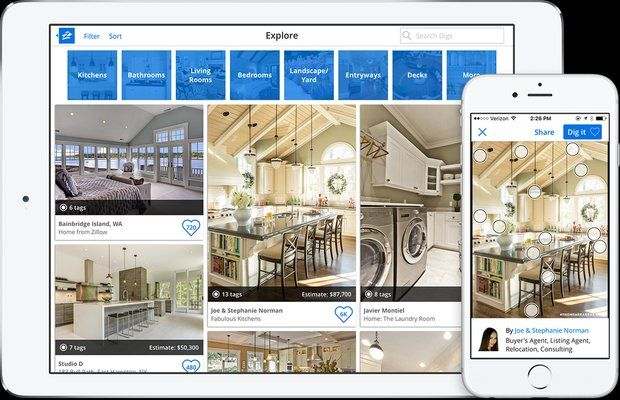
In the West, designers use the Zillow app to estimate the cost of interior design, select finishing materials and furniture, and choose color schemes. Here, Zillow serves more as a source of inspiration.
Thousands of visualizations and photos of real interiors of all kinds of rooms, decorated in various styles, are collected in one place. You can save images and leave comments, use them as a basis for new projects.
Where to download: free on iTunes
ColorSmart by BEHR
Paint manufacturer BEHR has made it easier than ever to choose the right shade from a huge range of 2,500 colors. But the Behr Color Smart mobile app has much more to offer!
It allows you to see how the selected color will look in the interior, what additional shades should be used for it, and what tones to choose for bright accents. Any surface can be painted in any color with one click. This will allow you to visually evaluate the most daring color solutions and combinations.
Where to download: free on iTunes and Google Play
Moodboard Lite
Have you seen an interesting accessory or piece of furniture, a beautiful shade or wallpaper pattern, and want to save it? The Moodboard app for iOS allows you to immediately upload the image to your collage.
In addition, you can search for images on the Internet and also post them on the mood board. The app will save the link so that you don't have to search for the item later when preparing your estimate. And you can share the result with your colleagues, send it to your client, or print it via Apple AirPrint with a single click.
Where to download: free on iTunes

Roomstyler
The Roomstyler app does more than just create mood boards. It is one of the fastest and easiest ways to sketch a very realistic 3D visualization.
Roomstyler positions itself as a source of inspiration and a social network for designers. Here you can share your work and follow the creativity of your colleagues, exchange opinions, participate in contests, and simply view saved room interiors from around the world. The interface is in English, but it is intuitive.
Where to download: free on iTunes
Good interior design starts with convenient tools. This article features a selection of 11 apps that really help designers: from creating floor plans to choosing colors and furniture. These apps are simple but powerful — many work right on your phone and don't require extensive training. You can easily draw a floor plan, see what a room will look like in 3D, or select stylish details for the interior. These are not just useful programs, but real assistants in your daily work.
Planner 5D
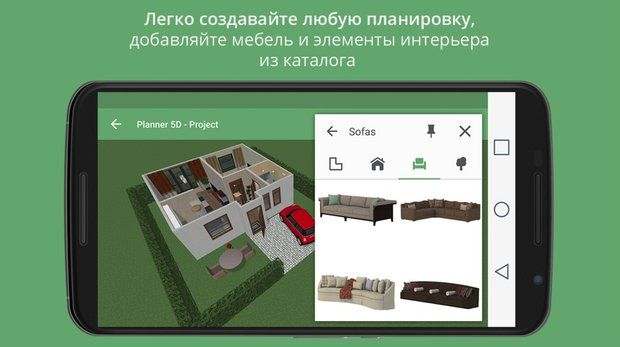
The Planner 5D app is easy to use. Even beginners can create simple 3D visualizations with it.
Planner 5D allows you to plan renovations or rearrangements, choose furniture and decorative elements from a regularly updated catalog, and apply various textures and color schemes. Once you save your project, you can send it or continue working on it in the web version from any device.
Where to download: free on iTunes and Google Play
AutoCAD
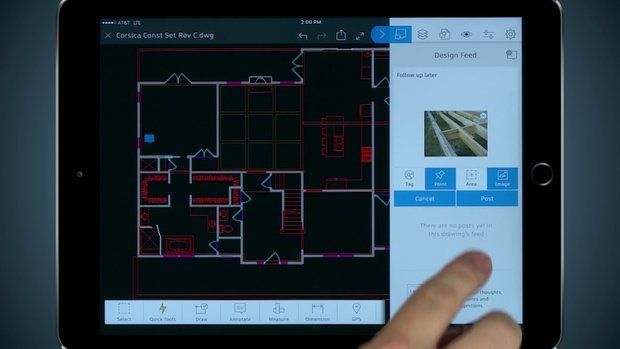
In AutoCAD, you can create an interior design project from scratch, edit an existing one, including in shared access, or send it. Drawings are created in both 2D and 3D, and three-dimensional models are compiled with millimeter precision.
This is no longer a temporary assistant for designers and architects, needed when visiting a site. The AutoCAD app allows you to work on a project from your tablet thanks to convenient zoom and panorama views of drawings.
Where to download: on iTunes and Google Play
Planoplan GO!
This is another 3D planner for creating visualizations, but with one fundamental difference. You can view the resulting project not only on your smartphone or tablet, but also in Google Cardboard virtual reality glasses.
In addition, you can upload your own textures, adjust sunlight depending on the time of day and season, and obtain specifications and wall layouts with installed windows, doors, sockets, and switches.
Where to download: free on iTunes and Google Play
RoomScan Pro
The app will help you measure all the parameters of the room and create a drawing: just hold your iPhone or iPad against the walls, press the button, and wait for the beep. If there are protruding corners in the room, each of them must be measured separately.
The app gets data using Apple's built-in gyroscope and GPS module. The margin of error is up to 10 cm, but after you get the pro version, the laser rangefinder will make perfectly accurate plans.
Where to download: on iTunes for $0.99
HutQA
If you need to draw up an estimate with a complete selection of finishing materials, a construction calculator will simplify the work. HutQA can calculate the required amount of paint and plaster, wallpaper and tiles, laminate and parquet, and even grout based on the size of the room.
Where to download: on iTunes for 75 rubles
IKEA Store
The IKEA app provides access to an electronic catalog and demonstrates how to use the brand's products in real interiors.
Here you can specify the dimensions and select the right item, make a shopping list, and find out which of the nearest stores has everything you need. In addition, the app will notify you of all IKEA special offers and promotions.
Where to download: free on iTunes and Google Play
As you can see, modern interior designers have access to a whole collection of smart tools right on their smartphones or computers. From ideas and planning to furniture selection and visualization, there is a convenient tool for every stage of the work.
The main thing is not to try to master everything at once. Choose one or two apps that cover your most pressing tasks and start with them. Gradually, you will understand which software suits your working style best.
Remember that even the most advanced programs are just tools in the hands of a professional. They save time and help convey ideas to the customer more clearly, but they cannot replace your taste, knowledge, and creative vision. Good luck with your experiments and productive work!


